Windows系统搭建
Minio下载

启动配置
在自己电脑磁盘随便新建一个文件夹,我这里是在F盘下面创建了一个Minio的文件夹,根据你自己的情况修改下面的步骤。
- 在minio下新建bin、data、log三个文件夹
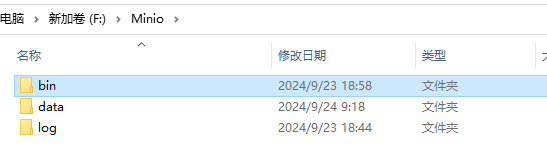
- 将下载的minio.exe放入bin文件夹
- bin文件夹下新建start.bat
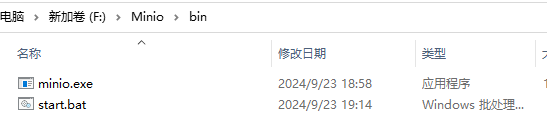
在start.bat里面编写以下内容,可以用记事本打开
shell
minio.exe server F:/Minio/data --console-address ":9005" --address ":9000"
# 以下内容不必写进去,只是命令解释
--console-address ":9005"	这是浏览器控制台端口
--address ":9000" 这是minio服务器端口,Springboot中要用最终文件内容

- 在bin目录下打开cmd命令行
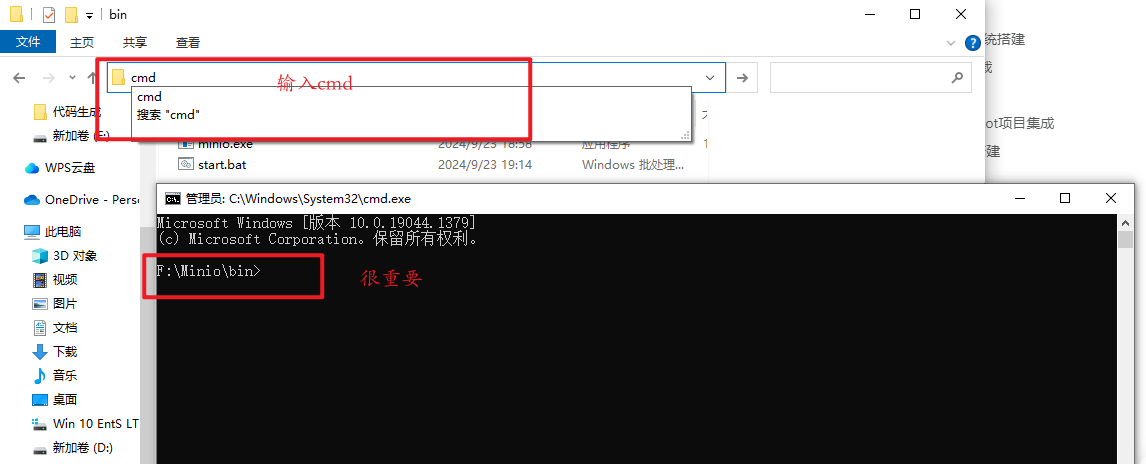
执行下面两条命令,设置控制台登录账号和密码
shell
setx MINIO_ROOT_USER admin
setx MINIO_ROOT_PASSWORD admin123456- 启动start.bat
- 浏览器访问http://127.0.0.1:9005

使用步骤4设置的账号密码登录
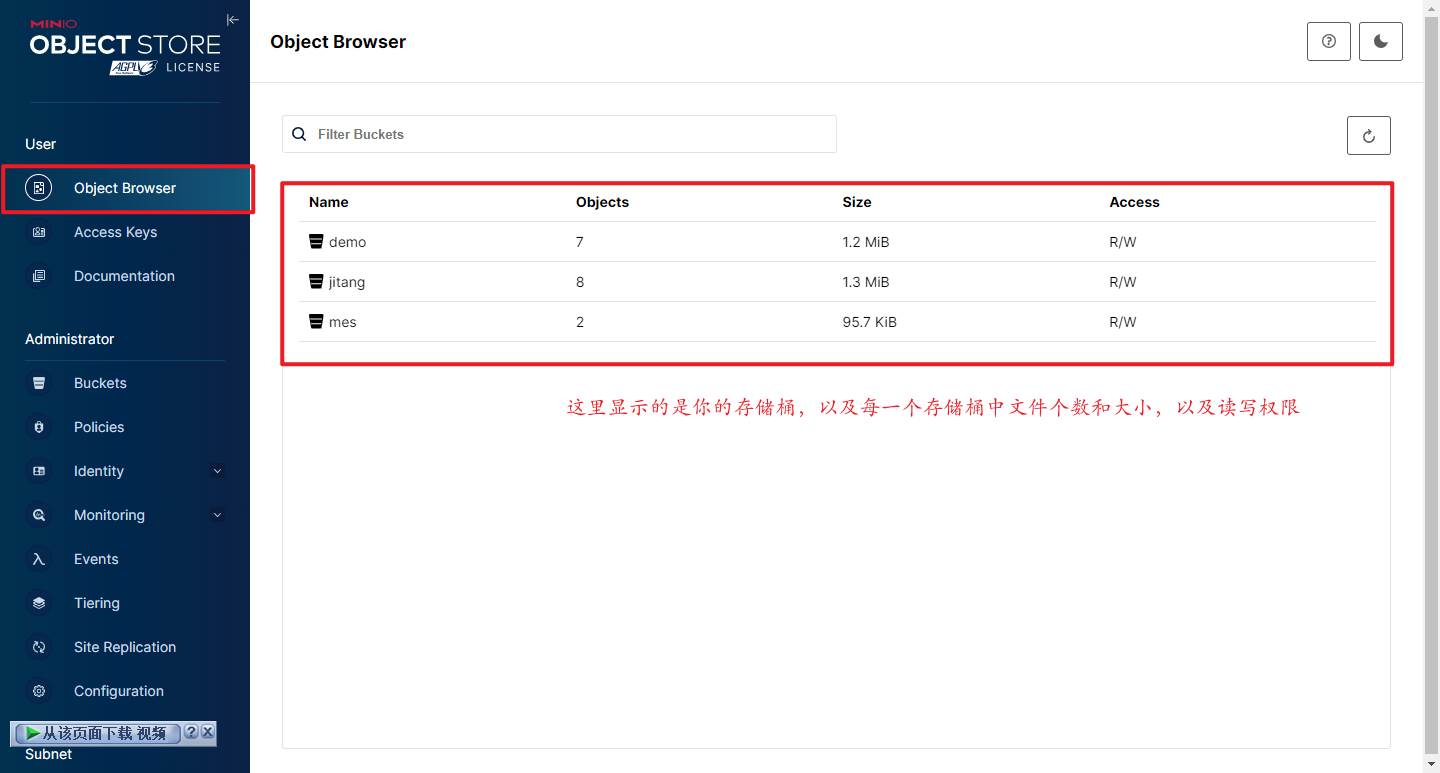
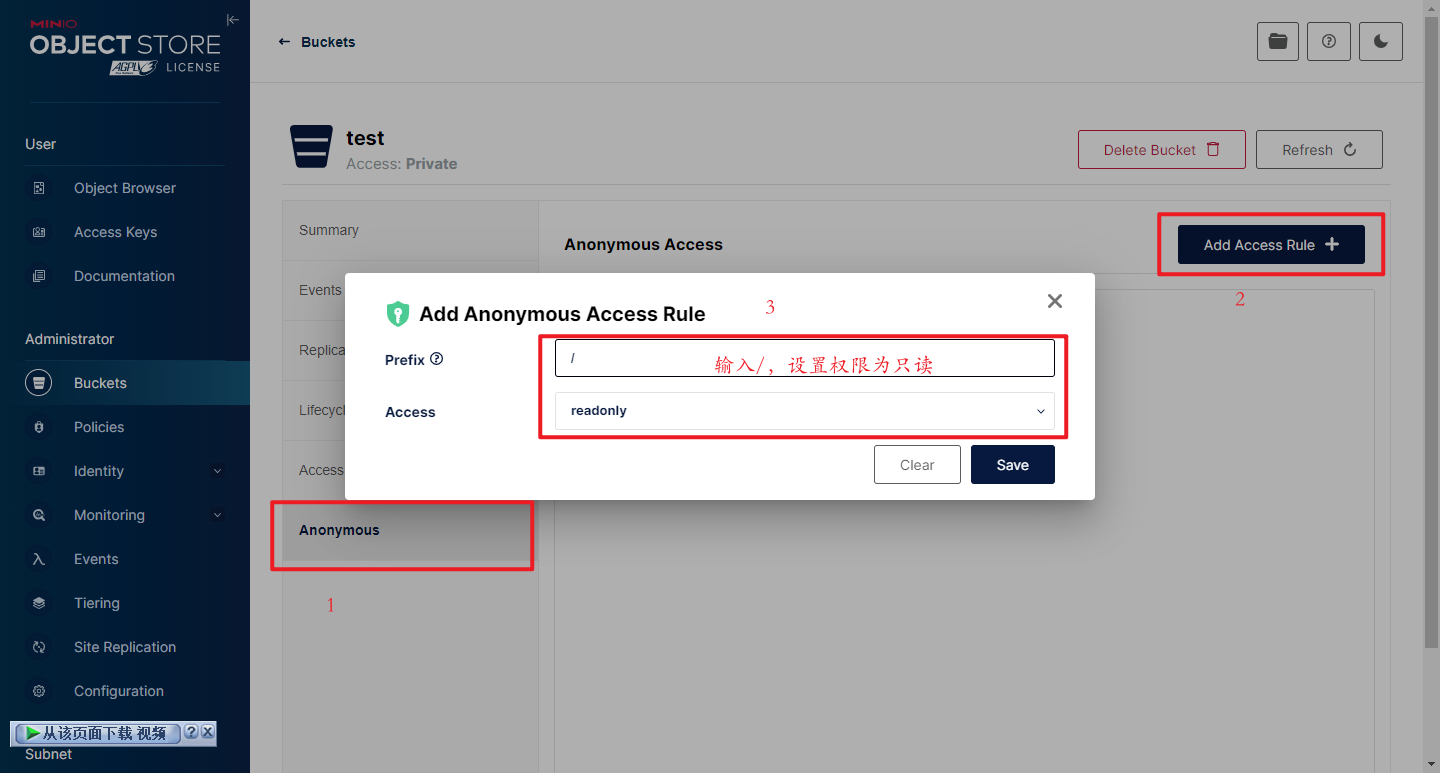
- 创建存储桶,设置匿名访问目录 / ,访问权限 readonly
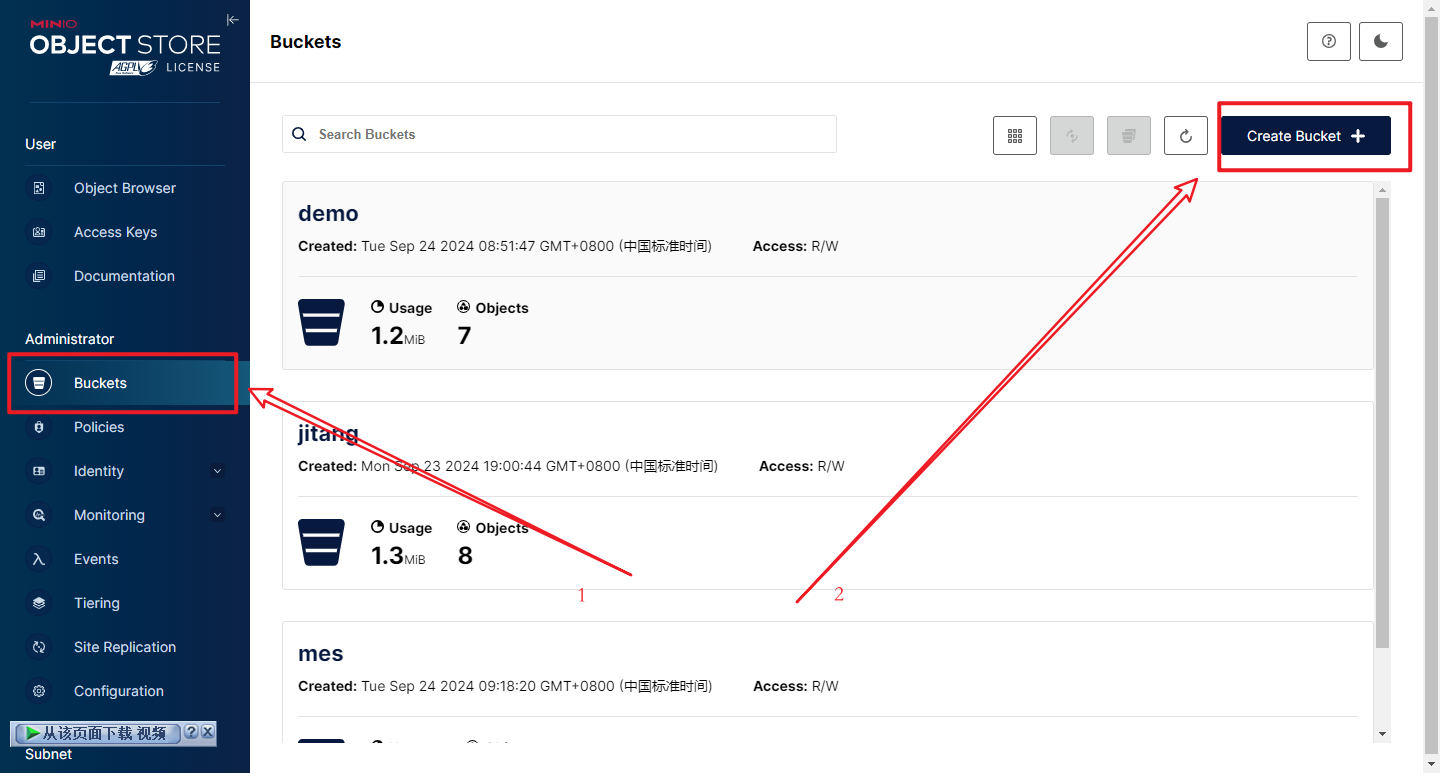
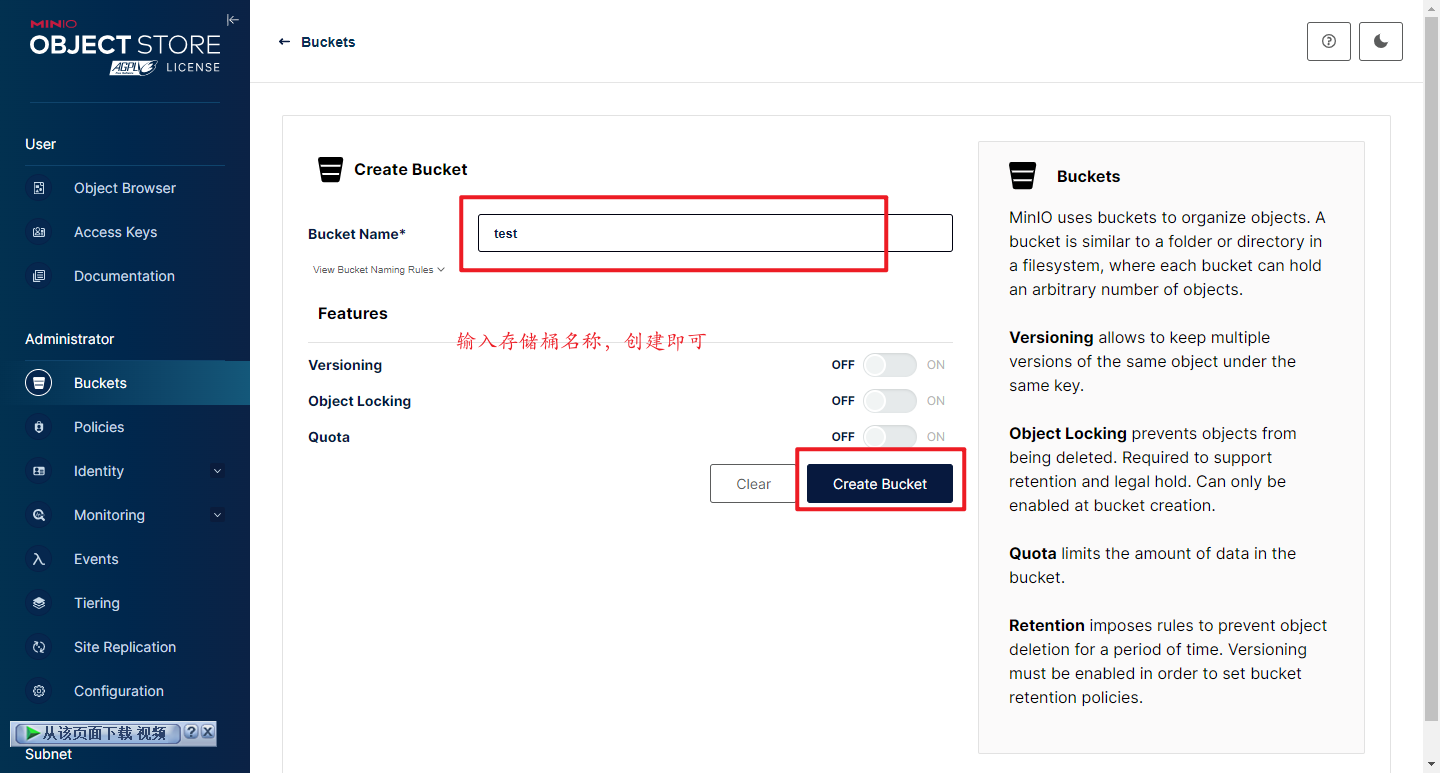
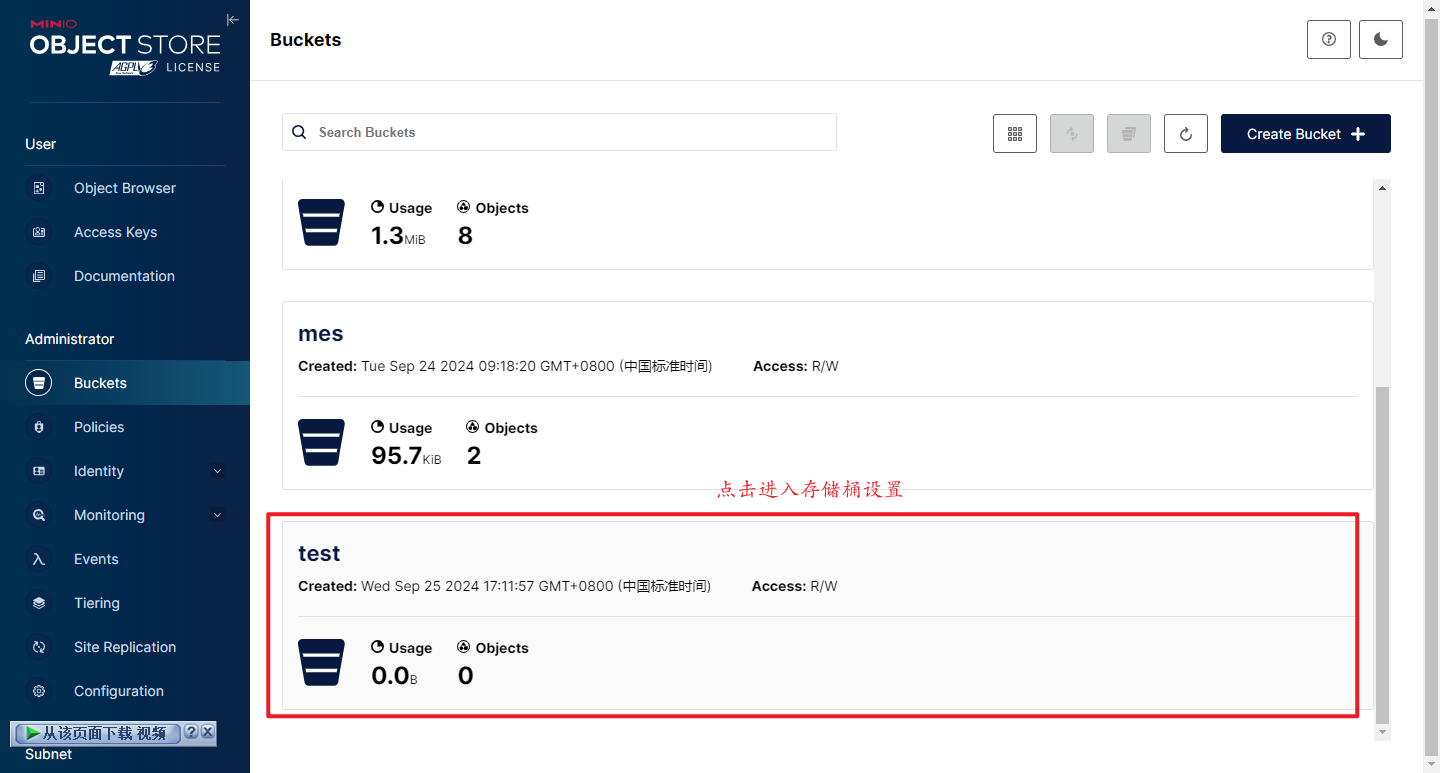
设置匿名用户访问权限,/ 是访问所有文件,readonly是只读
如果有其他文件夹,可以设置单独文件夹访问权限,例如:/下有一个images文件夹,则可以配置 /images
Linux系统搭建
创建文件夹
这里我在根目录创建了minio,在minio里面创建了bin、data、log

下载minio
进入/minio/bin文件夹
shell
cd /minio/bin
wget https://dl.minio.org.cn/server/minio/release/linux-amd64/minio给minio可执行权限
shell
chmod -x minio后台运行
创建服务脚本
shell
vim /lib/systemd/system/minio.serviceminio.service文件内容
shell
[Unit]
Description=minio daemon
After=syslog.target  network.target
Wants=network.target

[Service]
Type=simple
ExecStart=/minio/bin/minio server /minio/data --console-address ":9001"
Environment="MINIO_ROOT_USER=your-username"
Environment="MINIO_ROOT_PASSWORD=your-password"
Restart=always
RestartSec=1min
ExecStop=/usr/bin/killall minio

[Install]
WantedBy=multi-user.target设置服务开机自启动
shell
systemctl enable minio启动minio
shell
systemctl start minio查看服务状态
shell
systemctl status minioSpringBoot项目集成
导入依赖
xml
<!-- Minio 对象存储 -->
<dependency>
    <groupId>io.minio</groupId>
    <artifactId>minio</artifactId>
    <version>8.2.2</version>
</dependency>application.yml配置
yaml
minio:
  endpoint: http://127.0.0.1:9000	# 服务器地址
  accessKey: admin	# 登录用户名
  secretKey: admin123456	# 登录密码
bucketName: test # 存储桶名称MinioConfig配置文件
在config包下新建MinioConfig类
@Data注解是lombok依赖下的,用于简化代码,没有lombok依赖就自己手动生成get和set方法
java
package mall.config;

import io.minio.MinioClient;
import lombok.Data;
import org.springframework.boot.context.properties.ConfigurationProperties;
import org.springframework.context.annotation.Bean;
import org.springframework.stereotype.Component;

/**
 * Minio配置类
 *
 * @author WYH
 * @since 2024/9/23 下午7:33
 */
@Data
@Component
@ConfigurationProperties(prefix = "minio")
public class MinioConfig {
    /**
     * 服务地址
     */
    private String url;

    /**
     * 用户名
     */
    private String accessKey;

    /**
     * 密码
     */
    private String secretKey;

    /**
     * 存储桶名称
     */
    private String bucketName;

    @Bean
    public MinioClient getMinioClient() {
        return MinioClient.builder().endpoint(url).credentials(accessKey, secretKey).build();
    }


}MinioUtils工具类
在utils包下新建MinioUtils类
java
package mall.utils;

import io.minio.BucketExistsArgs;
import io.minio.MakeBucketArgs;
import io.minio.MinioClient;
import io.minio.PutObjectArgs;
import org.springframework.stereotype.Component;
import org.springframework.web.multipart.MultipartFile;

import javax.annotation.Resource;
import java.io.IOException;
import java.io.InputStream;

/**
 * Minio存储上传工具类
 *
 * @author WYH
 * @since 2024/9/24 上午8:40
 */
@Component
public class MinioUtils {

    @Resource
    private MinioClient minioClient;


    /**
     * 判断bucket是否存在,不存在则创建
     */
    public void existBucket(String name) {
        try {
            boolean exists = minioClient.bucketExists(BucketExistsArgs.builder().bucket(name).build());
            if (!exists) {
                minioClient.makeBucket(MakeBucketArgs.builder().bucket(name).build());
            }
        } catch (Exception e) {
            e.printStackTrace();
        }
    }

    /**
     * 文件上传
     *
     * @param file
     * @return
     */
    public String upload(MultipartFile file, String bucketName) {

        // 如果桶不存在,直接创建
        existBucket(bucketName);

        // 获取原始文件名
        String fileName = file.getOriginalFilename();

        // 修改文件名,按照指定的规则修改,本例增加了一个时间戳
        String[] split = fileName.split("\\.");
        if (split.length > 1) {
            fileName = split[0] + "_" + System.currentTimeMillis() + "." + split[1];
        } else {
            fileName = fileName + System.currentTimeMillis();
        }
        InputStream in = null;
        try {
            in = file.getInputStream();
            // 上传到minio
            minioClient.putObject(PutObjectArgs.builder()
                    .bucket(bucketName) //.bucket("img/" + bucketName)
                    .object(fileName)
                    .stream(in, in.available(), -1)
                    .contentType(file.getContentType())
                    .build()
            );
        } catch (Exception e) {
            e.printStackTrace();
        } finally {
            if (in != null) {
                try {
                    in.close();
                } catch (IOException e) {
                    e.printStackTrace();
                }
            }
        }
        // 返回上传的文件访问地址
        return bucketName + "/" + fileName;
    }

}FileController
java
package mall.controller;

import io.swagger.annotations.Api;

import javax.annotation.Resource;

import org.springframework.web.bind.annotation.*;
import org.springframework.web.multipart.MultipartFile;
import mall.service.FileService;
import mall.vo.ResultVO;

/**
 * 文件接口
 *
 * @author WYH
 * @since 2024/4/2 14:02
 */
@RestController
@Api(tags = "文件接口")
@RequestMapping("/file")
public class FileController {
    @Resource
    private FileService fileService;

    @PostMapping("/minio/upload")
    public ResultVO<String> uploadMinio(@RequestParam("file") MultipartFile file) {
        return fileService.minioUpload(file);
    }
}FileService
java
package mall.service;

import org.springframework.web.multipart.MultipartFile;
import mall.vo.ResultVO;

/**
 * 文件Service
 *
 * @author WYH
 * @since 2024/4/2 14:03
 */
public interface FileService {
    /**
     * minio文件上传
     * @param file
     * @return
     */
    ResultVO<String> minioUpload(MultipartFile file);
}FileServiceImpl
java
package mall.service.impl;

import org.springframework.stereotype.Service;
import org.springframework.web.multipart.MultipartFile;
import mall.config.MinioConfig;
import mall.service.FileService;
import mall.utils.MinioUtils;
import mall.vo.ResultVO;

import javax.annotation.Resource;


/**
 * FileServiceImpl
 *
 * @author WYH
 * @since 2024/4/2 14:03
 */
@Service
public class FileServiceImpl implements FileService {

    @Resource
    private MinioUtils minioUtils;

    @Resource
    private MinioConfig minioConfig;

    @Override
    public ResultVO<String> minioUpload(MultipartFile file) {
        // 获取minio服务的url和存储桶
        String url = minioConfig.getUrl();
        String bucketName = minioConfig.getBucketName();

        // 文件上传
        String upload = minioUtils.upload(file, bucketName);
        // TODO 可以增加文件保存数据库逻辑,做文件管理功能
        // 拼接访问路径并返回
        return ResultVO.ok(url + "/" + upload);
    }
}ResultVO
java
package mall.vo;

import io.swagger.annotations.ApiModel;
import lombok.AllArgsConstructor;
import lombok.Builder;
import lombok.Data;
import lombok.NoArgsConstructor;
import mall.enums.StatusCodeEnum;

import static mall.enums.StatusCodeEnum.SUCCESS;
import static mall.enums.StatusCodeEnum.FAIL;


@Data
@Builder
@NoArgsConstructor
@AllArgsConstructor
@ApiModel(value = "通用返回对象", description = "通用返回对象")
@SuppressWarnings("all")
public class ResultVO<T> {

    private Boolean success;

    private Integer code;

    private String message;

    private T data;

    public static <T> ResultVO<T> ok() {
        return resultVO(true, SUCCESS.getCode(), SUCCESS.getDesc(), null);
    }

    public static <T> ResultVO<T> ok(T data) {
        return resultVO(true, SUCCESS.getCode(), SUCCESS.getDesc(), data);
    }

    public static <T> ResultVO<T> ok(T data, String message) {
        return resultVO(true, SUCCESS.getCode(), message, data);
    }

    public static <T> ResultVO<T> fail() {
        return resultVO(false, FAIL.getCode(), FAIL.getDesc(), null);
    }

    public static <T> ResultVO<T> fail(StatusCodeEnum statusCodeEnum) {
        return resultVO(false, statusCodeEnum.getCode(), statusCodeEnum.getDesc(), null);
    }

    public static <T> ResultVO<T> fail(String message) {
        return resultVO(false, message);
    }

    public static <T> ResultVO<T> fail(T data) {
        return resultVO(false, FAIL.getCode(), FAIL.getDesc(), data);
    }

    public static <T> ResultVO<T> fail(T data, String message) {
        return resultVO(false, FAIL.getCode(), message, data);
    }

    public static <T> ResultVO<T> fail(Integer code, String message) {
        return resultVO(false, code, message, null);
    }

    private static <T> ResultVO<T> resultVO(Boolean success, String message) {
        return ResultVO.<T>builder()
                .success(success)
                .code(success ? SUCCESS.getCode() : FAIL.getCode())
                .message(message).build();
    }

    private static <T> ResultVO<T> resultVO(Boolean success, Integer code, String message, T data) {
        return ResultVO.<T>builder()
                .success(success)
                .code(code)
                .message(message)
                .data(data).build();
    }
}StatusCodeEnum
java
package mall.enums;

import lombok.AllArgsConstructor;
import lombok.Getter;

@Getter
@AllArgsConstructor
public enum StatusCodeEnum {
    SUCCESS(200, "成功"),//成功
    FAIL(400, "失败"),//失败
    BAD_REQUEST(400, "Bad Request"),
    UNAUTHORIZED(401, "认证失败,账号或密码错误"),//未认证
    NOT_FOUND(404, "接口不存在"),//接口不存在
    INTERNAL_SERVER_ERROR(500, "系统繁忙"),//服务器内部错误
    METHOD_NOT_ALLOWED(405, "方法不被允许"),
    EMPTY_DATA(300, "数据为空"),//数据不存在
    Good_Is_Exist(301, "商品已在购物车中"),

    /*参数错误:1001-1999*/
    PARAMS_IS_INVALID(1001, "参数无效"),
    PARAMS_IS_BLANK(1002, "参数为空"),
    USER_IS_EXITES(1003, "账号或用户名已存在");

    private final Integer code;

    private final String desc;


}Apifox接口测试
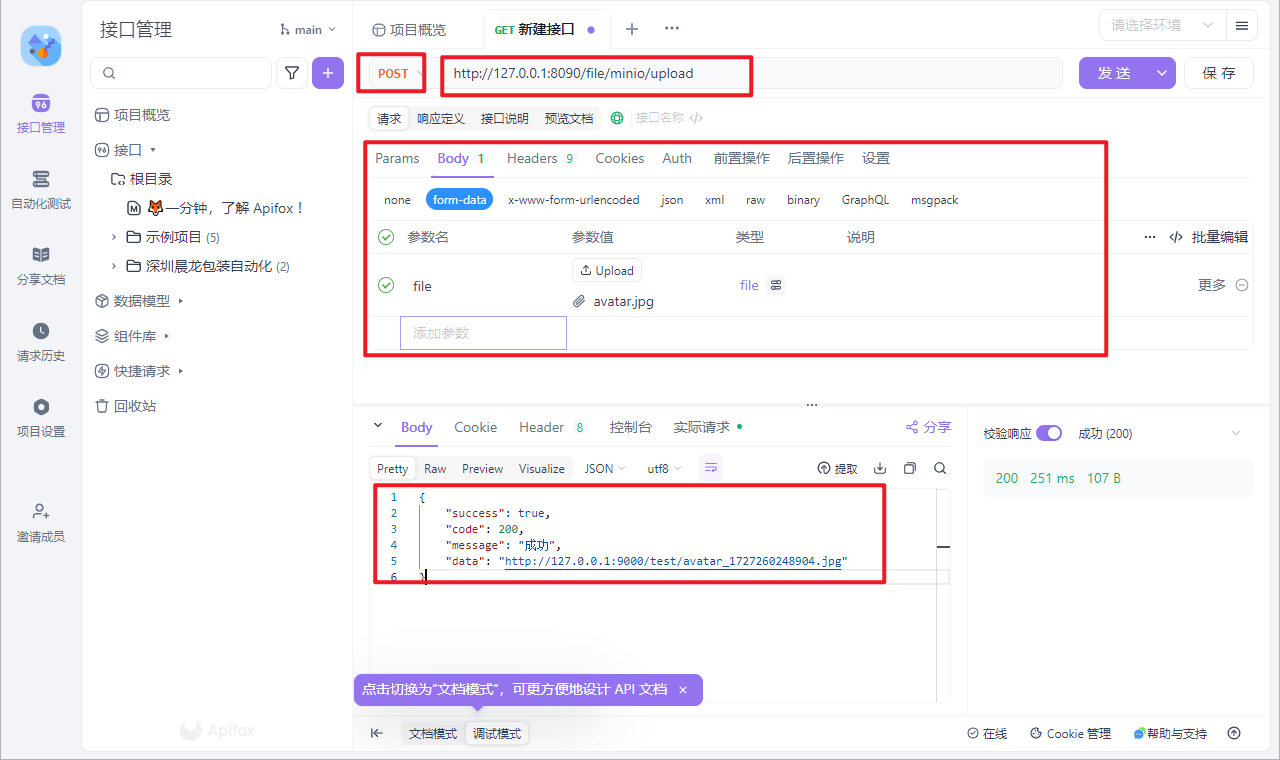
浏览器成功访问